

Working with issues
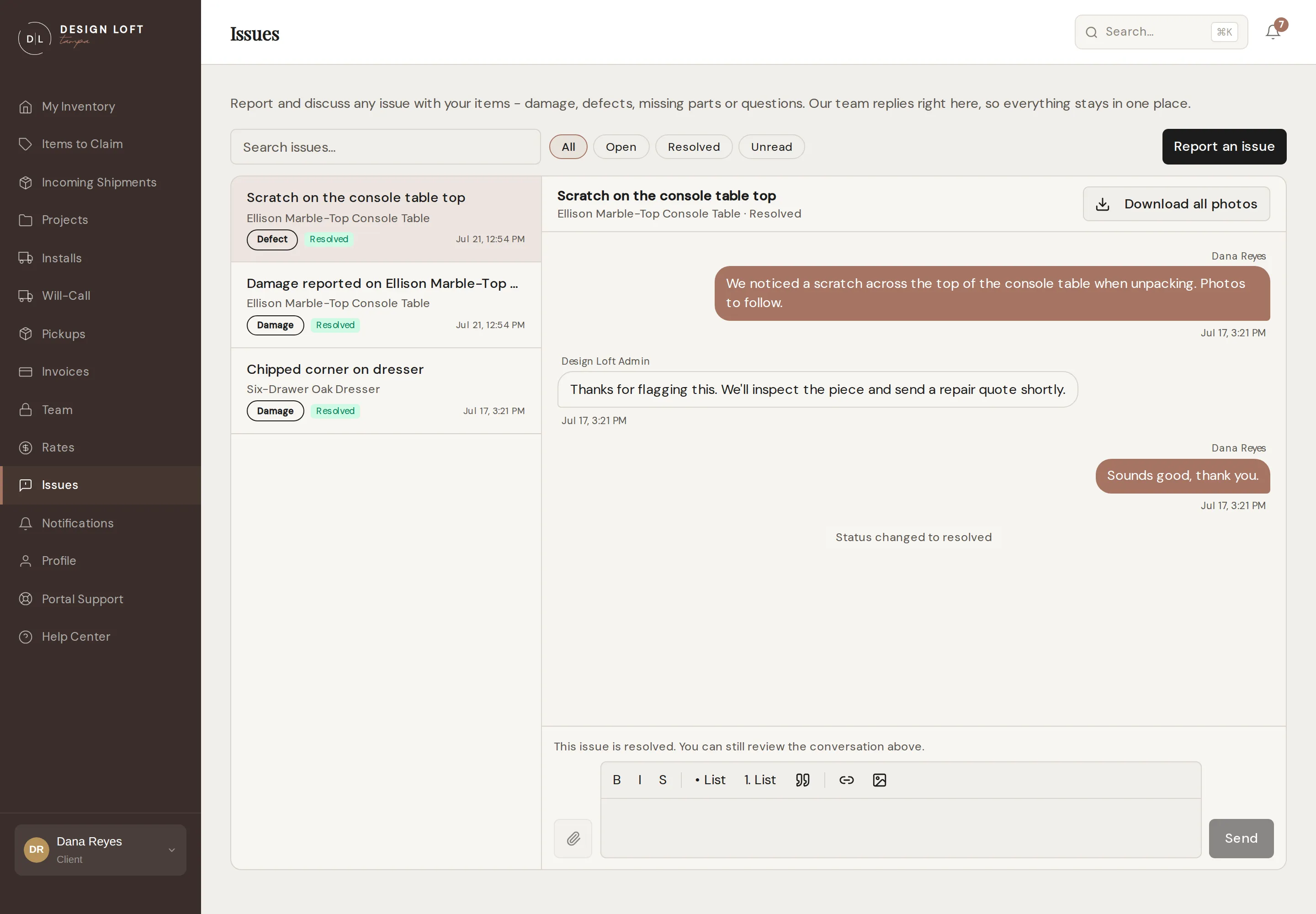
Issues in the sidebar is a two-pane inbox: your issues on the left, the selected conversation on the right. The sidebar badge counts threads with something new for you.
Finding your way around
Section titled “Finding your way around”- Filter pills - All, Open, Resolved, plus On hold whenever one of your threads is parked - see When a thread goes on hold.
- Unread - a toggle next to the pills that narrows the list to threads with something you have not read yet. Turn it off again to see everything.
- Search - by subject or item.
- Each thread shows its item, type, status, and the latest activity.
Replying
Section titled “Replying”Open a thread, type your reply, and add photos or PDFs if they help. There are two ways to send a picture, and both stay in the conversation:
- Attach it with the paperclip button, which is also the way to send a PDF. What you attach appears as small tiles just above your message.
- Put it in the message itself with the picture button in the reply toolbar, or by pasting a photo straight into what you are typing, or dragging one onto the box. The photo sits in your text exactly where you put it, so you can write a line about each one: “this is the leg”, then “and here it is from underneath”.
Everything you and our team post stays in the thread, tied to the item - a complete record you can revisit any time, including from the item’s detail page.
Every reply is signed. The name of whoever wrote it sits just above the message, on both sides of the conversation: which of us answered you, and which of your team wrote in when more than one person uses your portal. Notes the portal posts by itself, like a status change, carry no name, and a report written on our inspection bench is signed underneath with the initials of the inspector who wrote it.
Looking closely at a photo
Section titled “Looking closely at a photo”Photos in a thread are shown small so the conversation stays readable. Click any one of them to fill the screen with it. How the photo got there makes no difference: a tile attached above a message and a photo sitting inside the message text both open the same way, and your pointer turns into a magnifier over anything you can open.
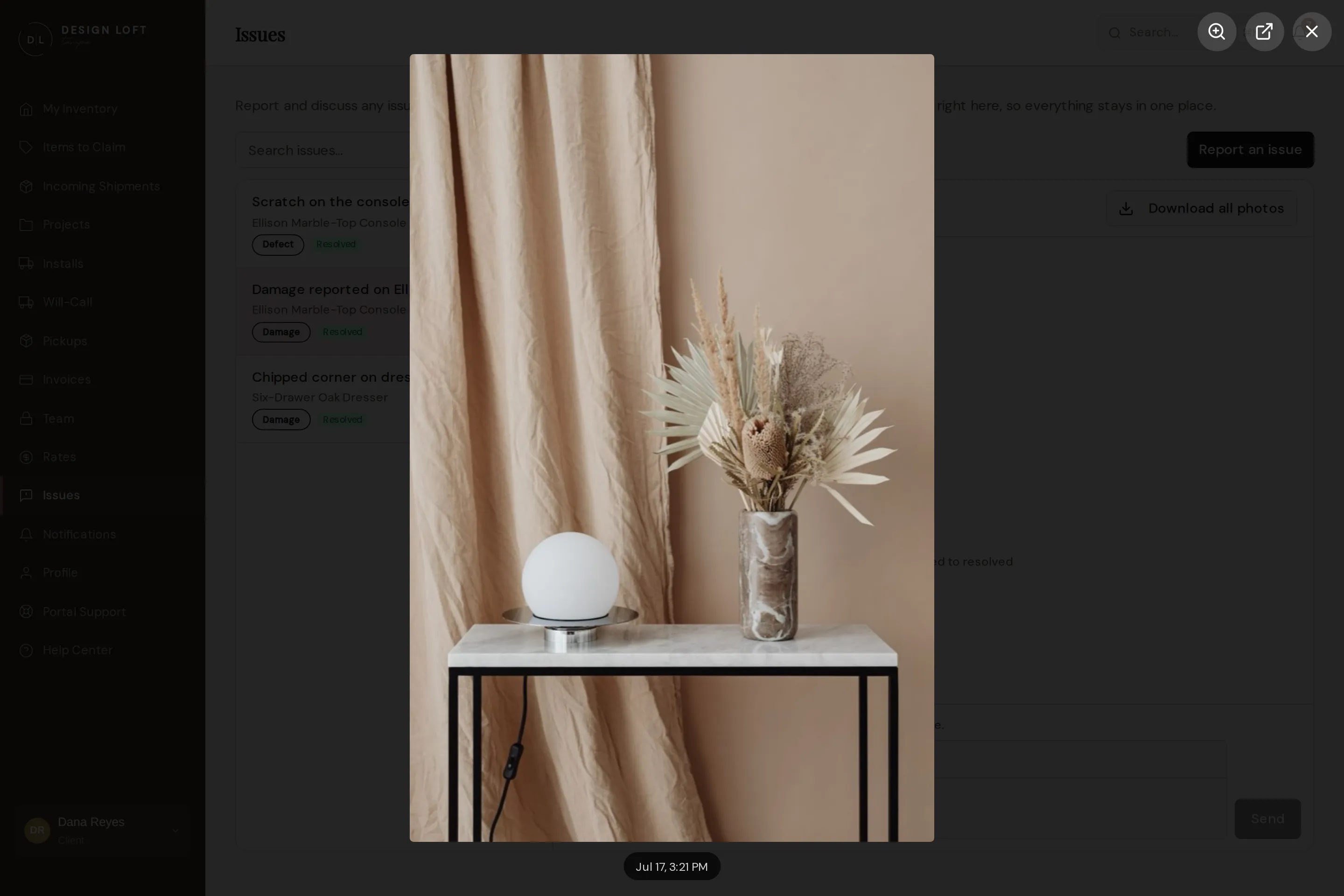
From there you can:
- Move between photos with the arrows on either side, or your keyboard’s left and right arrow keys. This walks every photo in the thread, attached ones and ones written into a message alike, not just the ones on the message you clicked - handy when a piece was photographed at the dock and again on the bench. The line along the bottom counts where you are and names who sent that photo and when.
- Zoom in with the magnifier button at the top, or by clicking the photo, to see it at full size. Small print on a shipping label reads at this size when it does not at any other. Click it again to fit the whole photo back on screen.
- Open the original in a new tab, with the arrow button at the top, if you want to save it or send it on.
Press Esc, or click outside the photo, to go back to the conversation.
Saving every photo for a claim
Section titled “Saving every photo for a claim”Filing a claim with your vendor or carrier usually means sending them every picture of the piece. You can collect them all without leaving the conversation:
- Open the conversation about the piece.
- Click Download all photos at the top of the conversation.
- Your browser saves one zip file named after the item.
Inside, the pictures are sorted into folders: the photos we took when the piece arrived, the damage photos from its report, and the photos and PDFs shared in each conversation about it. It is the same download as the button on the item’s own page - see Downloading every photo of a piece for what each folder holds.
New photos can land in an open thread
Section titled “New photos can land in an open thread”Our team adds to a thread on its own too. A piece flagged damaged when its box arrived gets its issue opened at the dock, hours before anyone unwraps it - so once we do open the box and inspect the piece, the close-up photos of the damage and the inspector’s notes are posted into that same thread. Nothing is replaced or overwritten: the newer post simply sits under the original one, and you are notified. If the report has not been sent to you yet, those photos simply become part of it, and you get the finished thing. See When we find the problem first.
A damage report our team raises is read by one of our managers before it is sent to you, so the first you see of it is a finished report rather than a raw alert. See We check a damage report before you get it.
Issue statuses
Section titled “Issue statuses”| Status | Meaning |
|---|---|
| Open / Awaiting staff | With our team to review or act |
| Awaiting you | We need something from you - a photo, a decision, an approval |
| On hold | Parked while we wait on someone outside the conversation, and it says who |
| Resolved | Settled, with the outcome noted in the thread |
| Closed | Finished and filed, with nothing further expected on either side |
Awaiting you is the same thing your inventory calls Action required: the thread’s own page names who is being waited on, and an item’s row flags it so an open ball in your court is visible without opening Issues.
If something resurfaces after a thread is resolved, just reply again or open a fresh issue on the same item - the history stays attached either way.
When a thread goes on hold
Section titled “When a thread goes on hold”Some issues wait on somebody who is not in the conversation - most often a vendor who owes us a repair quote, a replacement date, or a decision on a claim. That can take days, and a thread sitting there marked as waiting on you or on us tells you nothing.
So we put it On hold and say what it is waiting for. You will see that in two places:
- In the thread, as a note reading “On hold - waiting on the vendor’s repair quote”, posted at the moment we park it.
- On the thread’s heading, next to the status, so the reason is there every time you open it.
You are notified when a thread goes on hold, the same as any other change.
A thread on hold is still live. You can reply on it whenever you like - a nudge is welcome if it has been quiet too long - and it still has to reach an ending. What it is not is work anybody can move today, so it comes out of your Open filter while it waits and sits in its own On hold filter instead. That pill appears next to Open, with a count, as soon as you have one parked, and it is gone again when you have none.
This keeps Open meaning what you would expect it to mean: threads waiting on somebody, not threads waiting on a vendor’s quote. Nothing is hidden - All still lists everything, and a parked thread carries its On hold status and its reason wherever it appears.
When the thing we were waiting on turns up, we take it off hold, it returns to Open, and the conversation carries on where it left off.
If we repair the piece
Section titled “If we repair the piece”Sometimes the answer to a damaged item is to have it repaired rather than returned or replaced. A repair shop does the work and bills us for it once it is finished, and you pay for the repair on its own invoice, separate from your monthly statement, so you can pass it on to the client whose piece it was without picking it out of a longer document.
Because the price follows what the work actually took, a repair is settled after it is done rather than fixed in advance: it is priced from what the repair shop charged plus our handling, the same way a pickup we make for you is. When a repair is one we want your go-ahead on before anyone starts, we send a quote in the thread first and wait for your approval.
You will see a note in the issue thread when the repair is invoiced, reading Repair invoice … raised with a link to it, and the invoice itself arrives the way every invoice does. It reads Claim / repair in your invoice list, and its line names what was repaired and, when the work was by the hour, the hours it took. The piece’s storage and receiving are unaffected and stay on your monthly statement.
If a repair leaves us owing you something - fabric you supplied for it, say - we take it off an invoice as a credit - one you have not paid in full yet, or your next one - as a line of its own with a minus amount and a note saying what it is for. See Credits and one-off charges.