

Holding an install date
Sometimes the calendar firms up before the furniture does: the site will be ready on a certain day, but the pieces are still on order. A date hold reserves that install date now - before anything has reached the warehouse - and you confirm the actual items once they arrive.
Requesting a hold
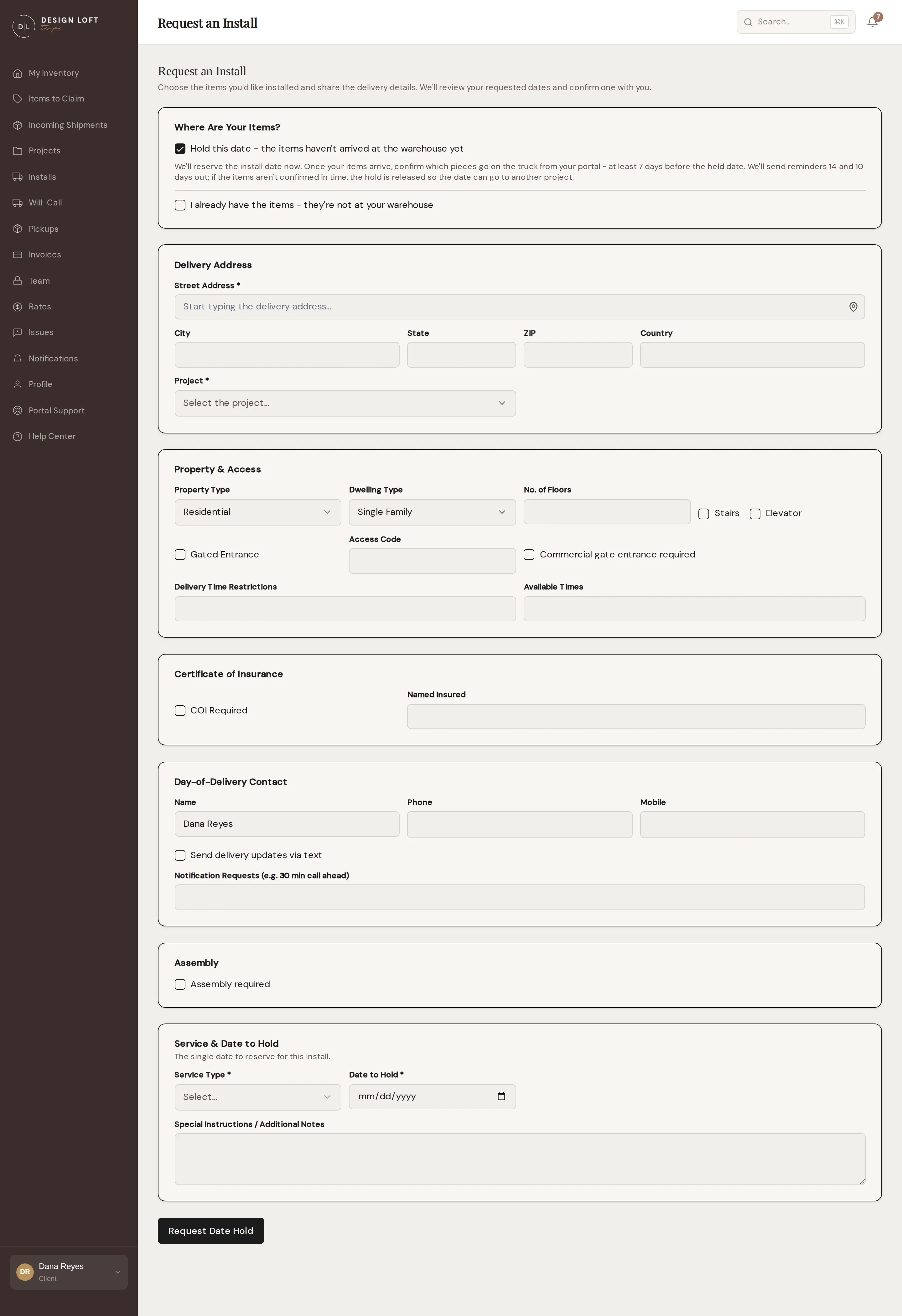
Section titled “Requesting a hold”- Open Installs and click Hold a Date. (You can also start a regular request and, under Where Are Your Items?, check Hold this date - the items haven’t arrived at the warehouse yet.)
- Fill in the form as usual: the address, the project, site details, and the service level. There is no item picker in hold mode, and instead of two or three date options you give the single Date to Hold. Holding a Saturday or Sunday is fine, and that install carries the flat weekend callout fee. A day we are closed, or a day our install team is already committed elsewhere, is refused as soon as you choose it, so a date you can hold is a date we could actually work - see Dates and closures.
- Click Request Date Hold.
The request appears under Installs as Hold Requested while we make sure the date works on our calendar. Once we confirm it, the status changes to Date Hold - the date is reserved for you.
Confirming your items
Section titled “Confirming your items”A held date needs its items confirmed at least 7 days before the install - that is the window we need to pull, pack, and plan the trip. The request’s page shows the exact confirm-by date, and we send you reminders 14 days and 10 days ahead of the held date.
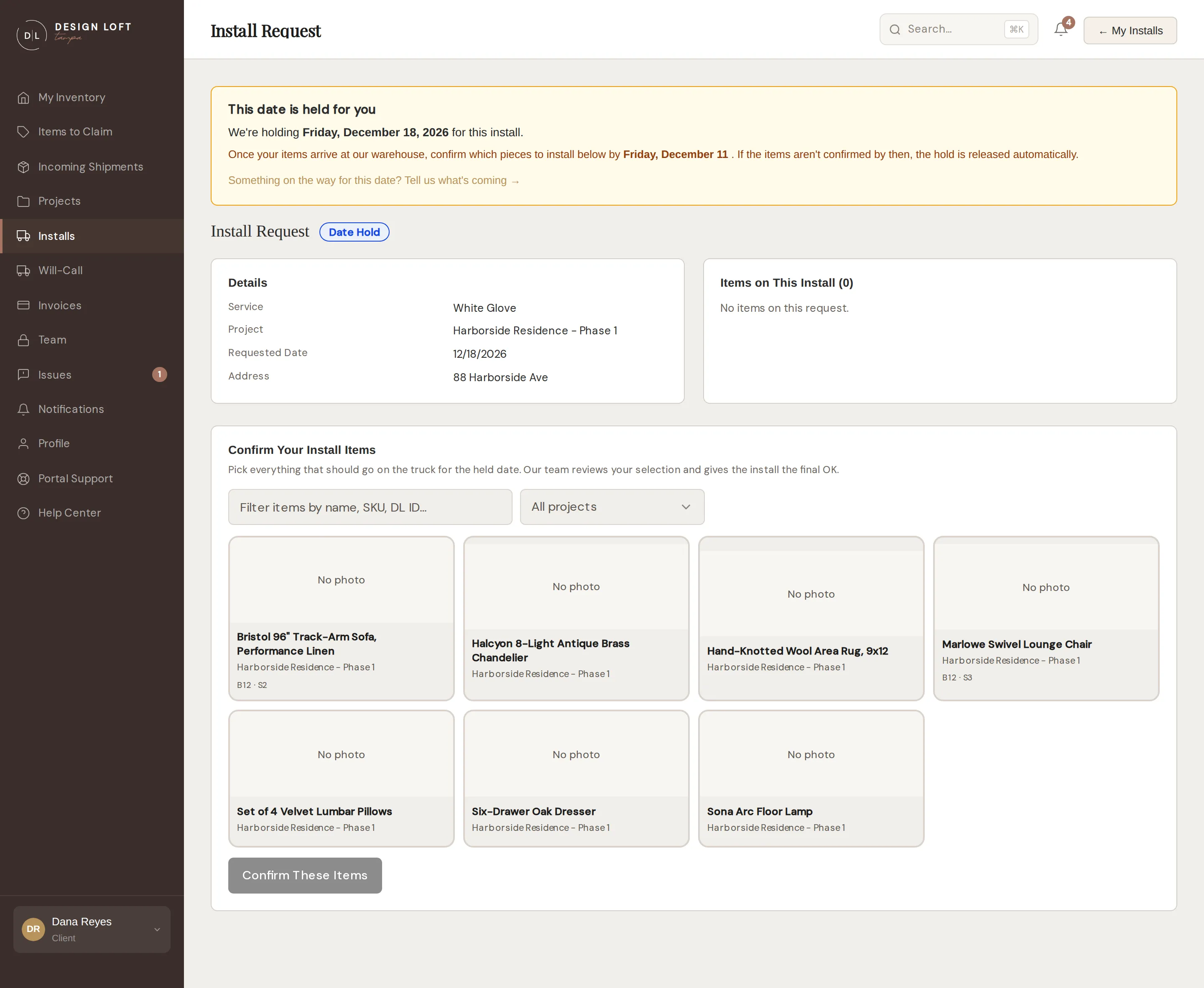
- Once your items have arrived and been checked in, open the request from Installs.
- Under Confirm Your Install Items, select everything that should go on the truck. It is the same photo grid as the request form: search by name, SKU, or label ID, filter by project, and rest your pointer on a tile to flip through its photos.
- Click Confirm These Items.
Our team reviews your selection and gives the install its final OK. From there it behaves like any other scheduled install - see Tracking install requests.
Confirming the items is also what gives the job an estimated cost: a held date has nothing on it to price yet, so the estimate appears on the request’s page once your pieces are on it - see Your install estimate.
If nothing has arrived yet, the section says so - items appear there for you to confirm as soon as they reach the warehouse.
If we offer you a different date
Section titled “If we offer you a different date”If the date you asked for is already full, we do not simply turn the request down: we offer you the nearest date we can do, and your request stays exactly as you filled it in. The status becomes Date Offered, you get a notification, and the request’s page opens with the date we can do and a note from our team about why yours did not work. A date we offer is always one we can genuinely work - the warehouse open and a crew free - so taking it is never a date that comes back to you a second time.
- Open Installs and click Details on the request.
- Read the date we offered at the top of the page.
- If it works, click Hold This Date. We hold that date for you straight away, and your confirm-by date moves with it - you then confirm your items against the new date as usual.
- If it does not work, open This date doesn’t work for me, tell us what would suit you better (even “any day the following week” helps), and click Send Back to Design Loft. It goes back to our team, who come back with another option.
Either way your request survives: nothing is cancelled and there is nothing to re-enter.
Please answer while the date is still worth holding. We remind you 14 days and 10 days before it, and if we still have not heard from you a week out, the date is released so it can go to another project - the same as a hold whose items were never confirmed. We let you know when that happens, and you can ask for a new date any time.
If you already have the items
Section titled “If you already have the items”Sometimes the pieces are not coming to us at all - they are already at your place, at the site, or were shipped straight to you, and you would just like our crew to install them. Tell us that instead of waiting for items that will never reach the warehouse.
- Open Installs and click Details on the held request.
- Under Confirm Your Install Items, open These items aren’t at your warehouse - I already have them.
- Describe what you would like installed. There is no pull list for a job like this, so your description is what our crew plans around.
- Fill in How many pieces? if you know the count. It is optional.
- Click I Have These Items.
That settles the hold the same way confirming items does: we stop asking you to confirm pieces, the countdown stops, nothing is pulled from our warehouse, and the request goes to our team for its final OK. Your description then sits on the request’s page under You’re installing your own items - to change it, message our team.
You can do this whether the date is held or we have offered you a different one. You can also start this way on a brand-new request instead of a hold - see Installing items you already have.
If the deadline passes
Section titled “If the deadline passes”If the items are not confirmed in time, the hold is released automatically so the date can go to another project, and the request shows Hold Released. A date we offered that nobody answered ends the same way. Nothing else happens - when you are ready, request a new hold or book a regular install.
Tell us what’s on the way
Section titled “Tell us what’s on the way”While a hold is open, its page links to Incoming Shipments - tell us what is shipping for that date, and each shipment you link appears on the hold under On the way for this date with its status. The moment a linked shipment is received, we prompt you to confirm your items, so the deadline never sneaks up on you.
Statuses at a glance
Section titled “Statuses at a glance”| Status | What it means |
|---|---|
| Hold Requested | You asked for the hold; we are confirming the date |
| Date Hold | The date is reserved; confirm your items at least 7 days out |
| Date Offered | Your date was full, so we offered another - accept it or tell us |
| Hold Released | The deadline passed without an answer; the date was freed |