

Invoices
Invoices is billing home base: your payment method on file, the automatic billing switch, what each of your jobs has cost, and every invoice we have sent you. For what each of these charges costs before it reaches an invoice, see Rates.
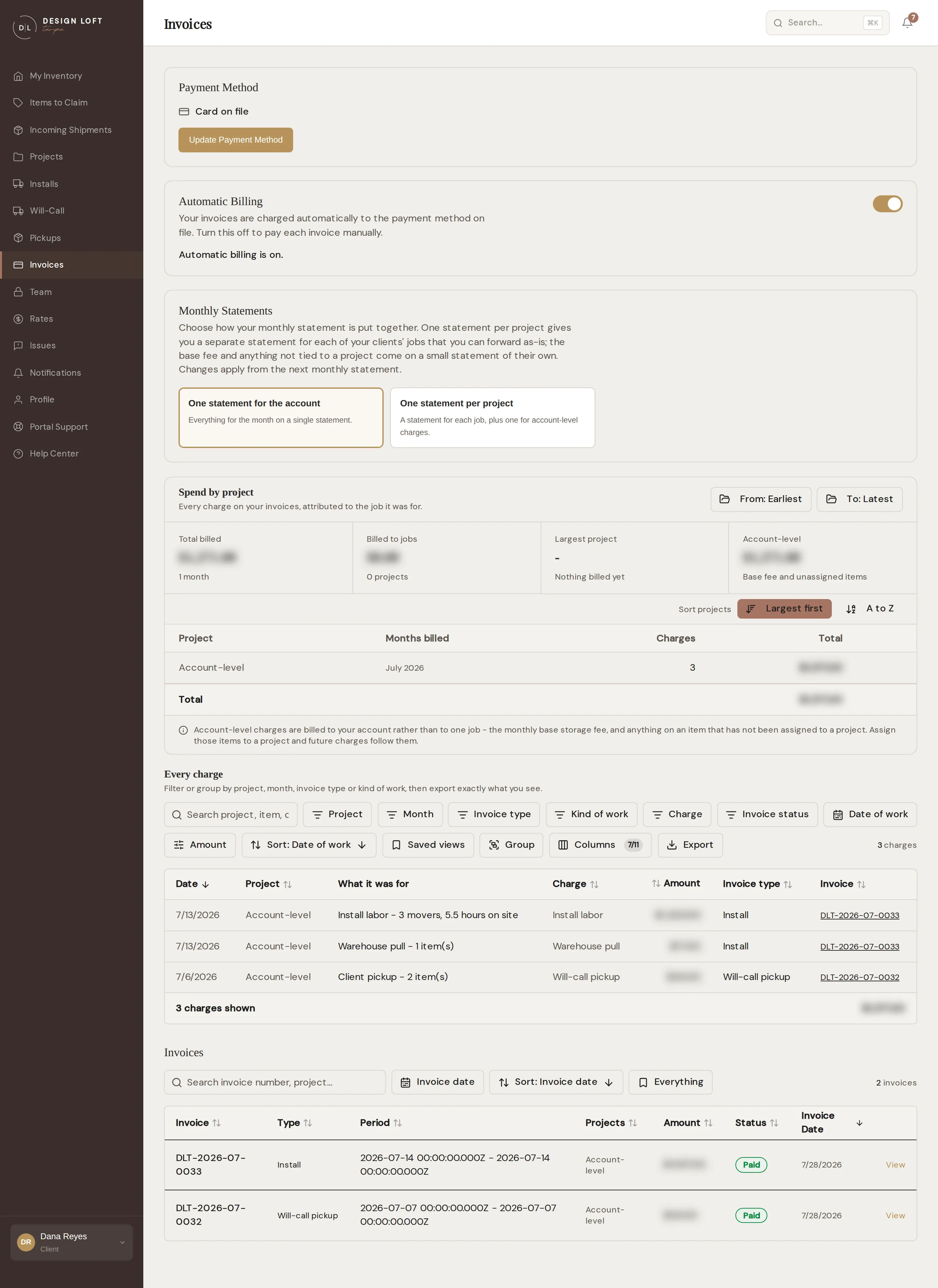
The invoice list
Section titled “The invoice list”Each row starts with the invoice number, then what kind of invoice it is, the period it covers, the jobs it touches, the amount, the status, and the date. A monthly statement covers a calendar month; an invoice for a single job - an install, a will-call pickup, a pickup we collected for you, or a vendor return - covers the day that job happened, or the run of days when an install took more than one.
The Type column says which of those each invoice is: Monthly statement, Install, Will-call pickup, Item pickup, or Vendor return. An invoice for a damage claim or a repair reads Claim / repair, and one we put together for you by hand reads Other. Open any invoice and the same label sits beside its status at the top of the page, followed by the job’s name when the invoice is for one of your projects, like Install for Harborside Residence. The column is there because the two kinds can name the same job in the same month - the install’s invoice settles the pieces that left with it, and the statement that follows carries what the job still had on the shelf - and from the list alone a statement can look like a second bill for a job you have already paid. See When a job is on two invoices.
The Projects column names the jobs on that invoice, largest first, so you can tell which invoice carries the Harborside work without opening anything. An invoice spanning more than two jobs names the two largest and counts the rest, like Harborside Residence, Sunset Loft +2 more. An invoice with nothing tied to a job reads Account-level - see Account-level charges.
The list opens newest first. Once a few seasons of statements and job invoices have built up, the bar above it and the column headings are the fastest way to the one you want - see Finding one invoice in a long list.
Select View to open the full invoice with line items and totals, grouped by the job each line was for - see Line items are grouped by job. Download PDF gives you a clean, printable copy on our letterhead for your records or your client’s file - it is made fresh each time you ask for it, so it always matches the invoice you are looking at. Print sits next to it if you would rather print the page as it is.
Finding one invoice in a long list
Section titled “Finding one invoice in a long list”The bar above the invoice list narrows it down to the invoice you are after - the same bar you will know from the Installs and Will-Call lists. It only changes what is on your screen: nothing about the invoices themselves moves, and there is nothing to save or undo.
- Search matches an invoice number, a job name, the type of invoice, a status, or an amount. Type harborside and only the invoices carrying that job stay on screen, including one where the job is folded into a +2 more.
- Status keeps only the invoices sitting where you choose - Sent, Overdue, or Paid. The menu offers only the statuses your own invoices are actually in, so if everything you hold is paid there is nothing to choose between and the menu does not appear at all.
- Project keeps just the invoices carrying the job you pick, or several jobs together if you pick more than one. It appears once an invoice of yours names a job.
- Invoice date narrows to a window of dates: the Last 30 days, the Last 90 days, or a from and to you set yourself.
- The view button - it reads Everything until you change it - holds three ready-made views. Everything is every invoice we have sent you, Unpaid is what is still owing (invoices at Sent or Overdue), and Paid is the ones behind you.
- Sort reorders the list, and so does clicking a column heading: Invoice, Type, Period, Projects, Amount, Status, or Invoice Date. Click the same heading again to reverse it. The list opens newest first, with the arrow on Invoice Date to say so. One click on that heading flips it oldest first.
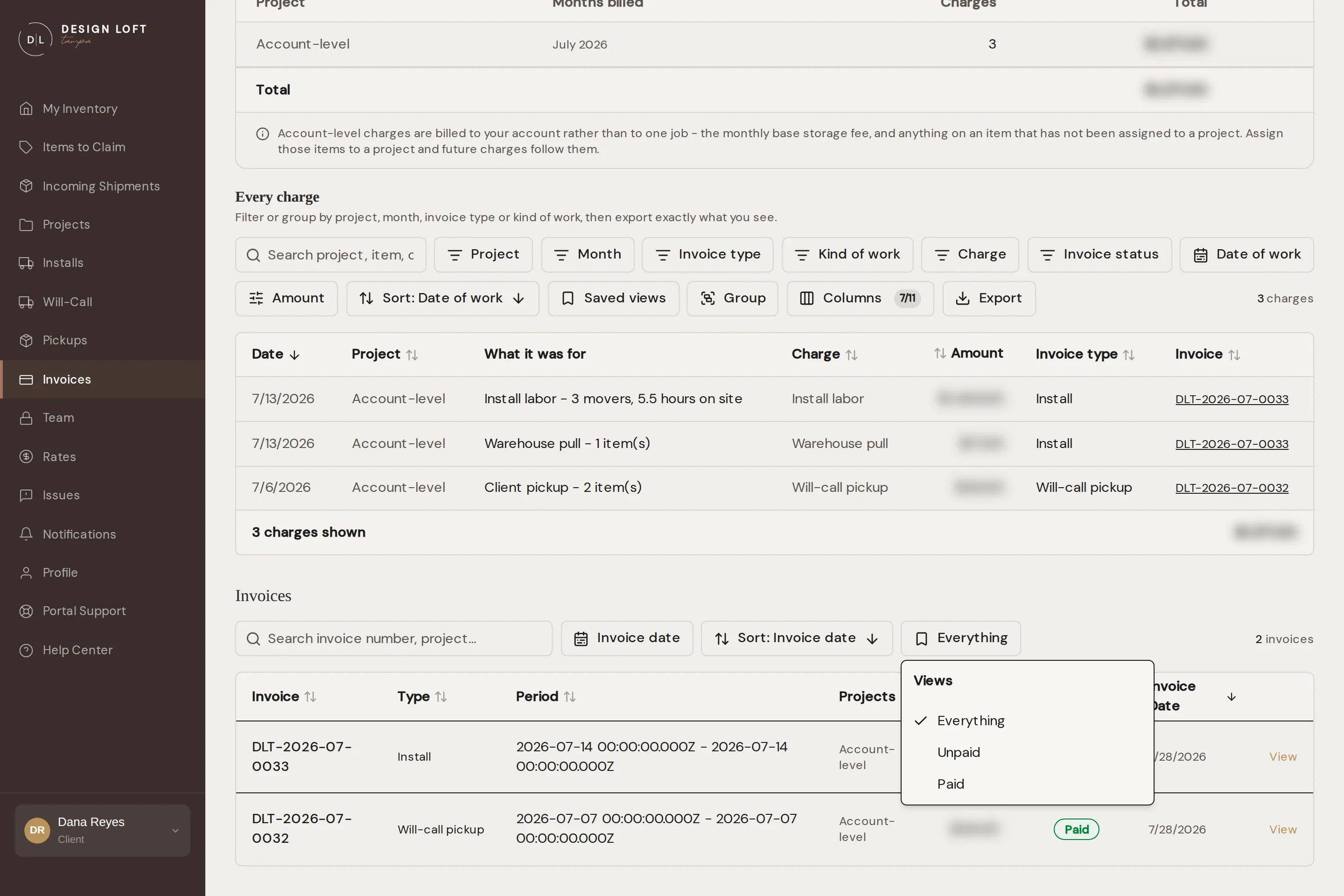
What you have typed, the dates you set, and the menu choices you make yourself all show as small tags under the bar - a ready-made view names itself on its own button instead. Select the × on a tag to drop just that one, or Clear all to go back to the full list. The count on the right says what you are looking at out of what you have, like 3 of 12 invoices, so a short list is never mistaken for a missing invoice.
The list opens the way you left it on the computer you are using, and the address bar keeps up with it - copy the address and a colleague on your account opens the same view. Left alone, it opens the way it always has: every invoice we have sent you, newest first.
One statement, or one per project
Section titled “One statement, or one per project”By default your month comes as a single statement: every job, plus the account-level charges, on one document. If you re-bill our charges to your own clients, you can ask for one statement per project instead. Each job then gets a statement of its own, with only that job’s storage, receiving, and pulls on it, so you can forward it to the client it belongs to exactly as we sent it. The base fee and anything not tied to a project come on a small statement of their own, because none of your clients owe those.
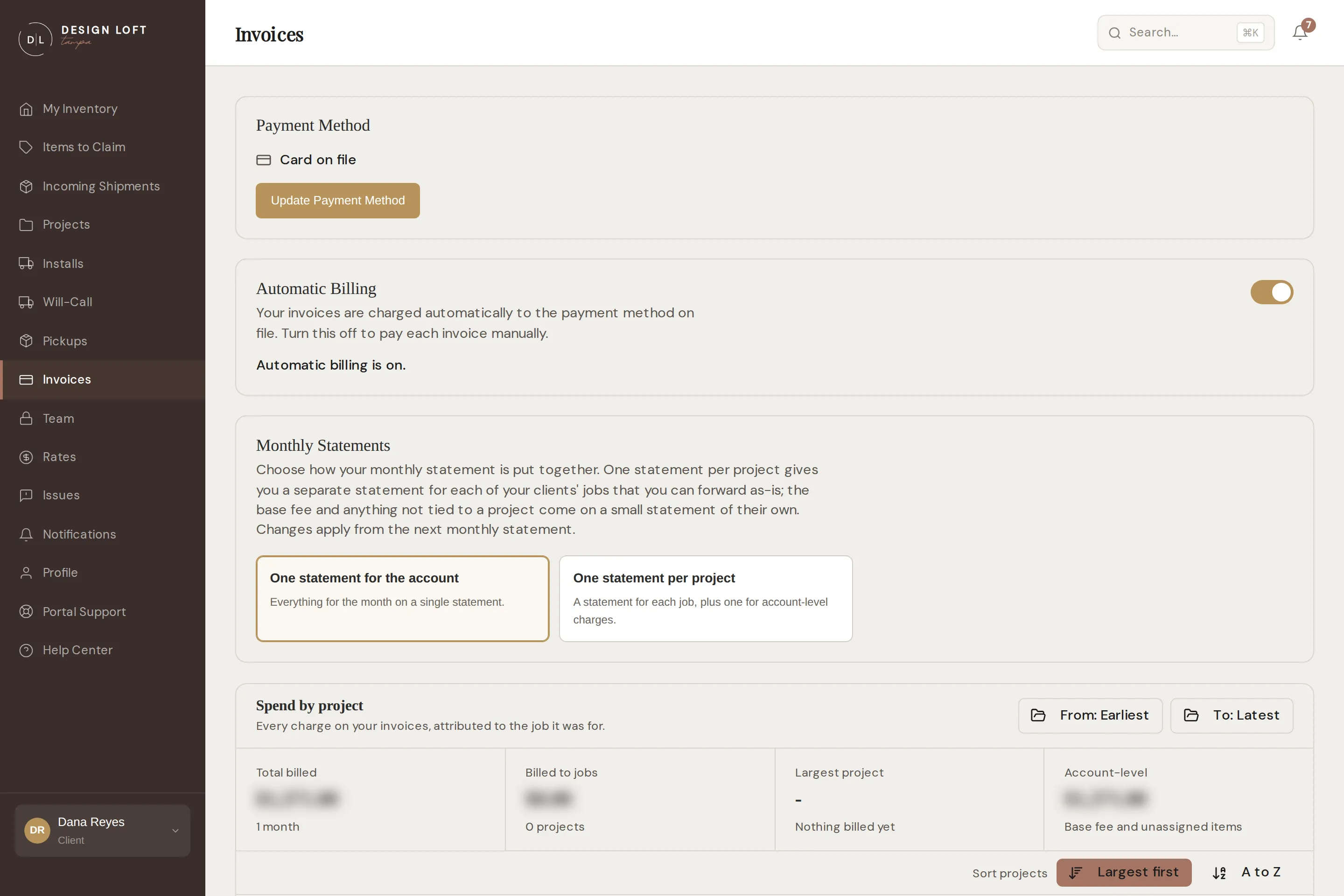
To change it:
- Open Invoices.
- Find Monthly Statements, just under the automatic billing switch. The option you are on is highlighted.
- Select One statement per project, or One statement for the account to go back to a single document. There is no save button: the choice takes the moment you select it, and a short message confirms which you will get from next month.
Only an account manager can change it. It applies from the next monthly statement: the month already on its way is not re-cut. Nothing about what you are charged changes either way - the same charges are simply split across more documents or gathered onto one - and automatic billing treats each statement the same, charging each on its own due date after the usual notice.
If a piece only gets its job while the month’s statements are being prepared, its charges can start out on the account-level statement. Before that statement goes out, we move them onto the job’s own statement, so what you forward to your client is complete. If the job’s statement has already been sent to you, they come on a second statement for the same job and month rather than changing the one you hold - so now and then a job has two statements for one month. Together they are that job’s month.
In the list, a per-project statement names its job in the Projects column and reads Monthly statement in Type, the same as before. Open one and the label beside its status names the job as well, like Monthly statement for Harborside Residence, and its PDF prints the job at the top, so you can tell at a glance which client it is for. The small statement for the account-level charges carries no job name. What each job has cost you works the same whichever you choose, since it is built from the lines rather than the documents.
Every invoice has a number
Section titled “Every invoice has a number”Every invoice carries a reference of its own, and it looks like DLT-2026-08-0001. You will find it in the first column of the list, in the heading when you open the invoice, on the PDF, and on the notice we send before a charge. It is also the number the invoice carries on our books, so quoting it puts us both on the same document instead of matching things up by amount and date.
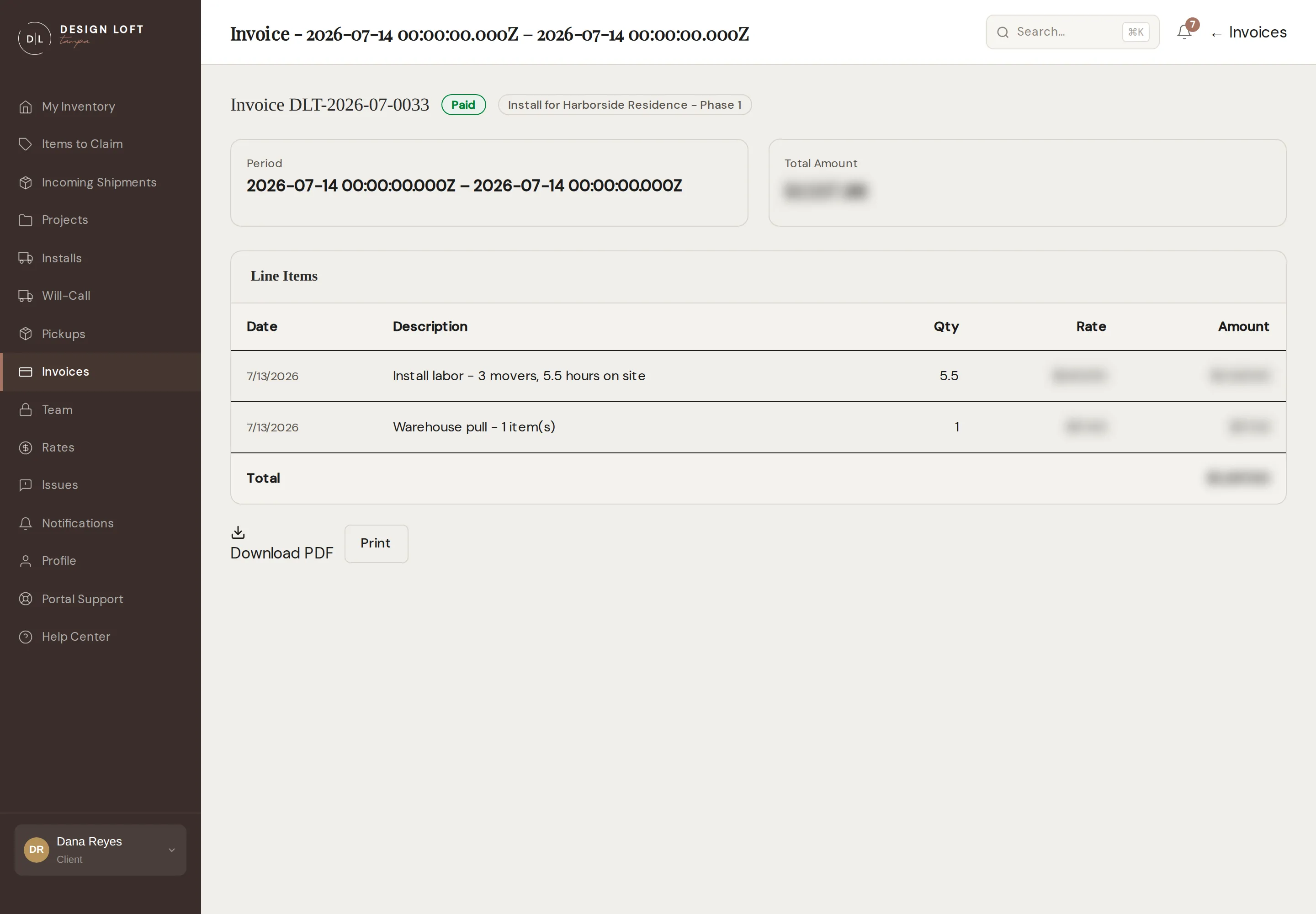
Older invoices have numbers too. We numbered everything already issued, oldest first, so nothing in your history is left without a reference to quote.
Line items are grouped by job
Section titled “Line items are grouped by job”Open an invoice that covers more than one job and the lines are grouped under the job they were for, with a subtotal on each group. That subtotal is the number you re-bill, so you never have to add up a column of forty lines to work out what the Harborside job cost on that statement.
Lines that belong to your account rather than to one job - the base storage fee, or a piece nobody has assigned to a project yet - sit in their own Account-level group instead of being folded into somebody’s job. See Account-level charges.
Each line also shows the date the work happened. On a monthly statement that is usually a day in the month the statement covers, but a line that missed an earlier statement - a piece received late in the month, say - lands on the next one carrying its real date, so you can always tell which month a charge belongs to.
When a job is on two invoices
Section titled “When a job is on two invoices”A job’s month is often billed on two documents. When pieces leave on an install, a will-call pickup, or a vendor return, that job’s own invoice settles them - their storage for the month they left, and their receiving if it had not been invoiced yet. The monthly statement that follows carries whatever the job still had with us. A month of storage is only ever charged once, so the two add up rather than overlap - but reading the statement on its own, a job you have just paid an install for can look like it is being billed again.
So under each job on an invoice, the page names any other invoice that billed the same job in the same month, with what that invoice carried for the job: for example Also billed for this job in August 2026: DLT-2026-08-0012 (Install · Paid · $1,185.00). Select the number to open it. The same note appears the other way round, so an install’s invoice points at the statement that carried the rest of that job’s month. Nothing is repeated between them: the note is there so you can see the two are halves of one month, not the same charge twice.
Download PDF is grouped exactly the same way, with the same subtotals on our letterhead, so the copy you forward to your client needs nothing done to it first.
One PDF per job
Section titled “One PDF per job”When you bill each of your own clients separately, you want each job’s share of the statement as its own document. Next to every job heading on the invoice is PDF for this job only, and under the invoice is a Download one PDF per job list with one button per job. Each file holds only that job’s lines and its subtotal, on our letterhead, with the job named in the top corner and a note saying which invoice it is part of - so the copy you attach to your own bill can never be mistaken for the whole statement. The Account-level file carries the charges that belong to no job, such as the base storage fee.
To get one job’s file:
- Open Invoices and select View on the invoice.
- Scroll to Download one PDF per job, under the Download PDF and Print buttons. Each button names a job and its subtotal on this invoice.
- Select the job. The PDF opens in a new tab, ready to save or forward. The PDF for this job only link beside that job’s heading in the line table opens the same file.
An invoice covering a single job is not split into groups: the whole invoice is that job, and a heading repeating its name would only get in the way. There is nothing to download per job on one of those - Download PDF already is that job’s file.
What each job has cost you
Section titled “What each job has cost you”Most of what we bill sweeps across several jobs at once. One monthly statement can carry storage, receiving, and pull charges for four different projects, so the invoice total is never the number you need when you re-bill a client for their job alone.
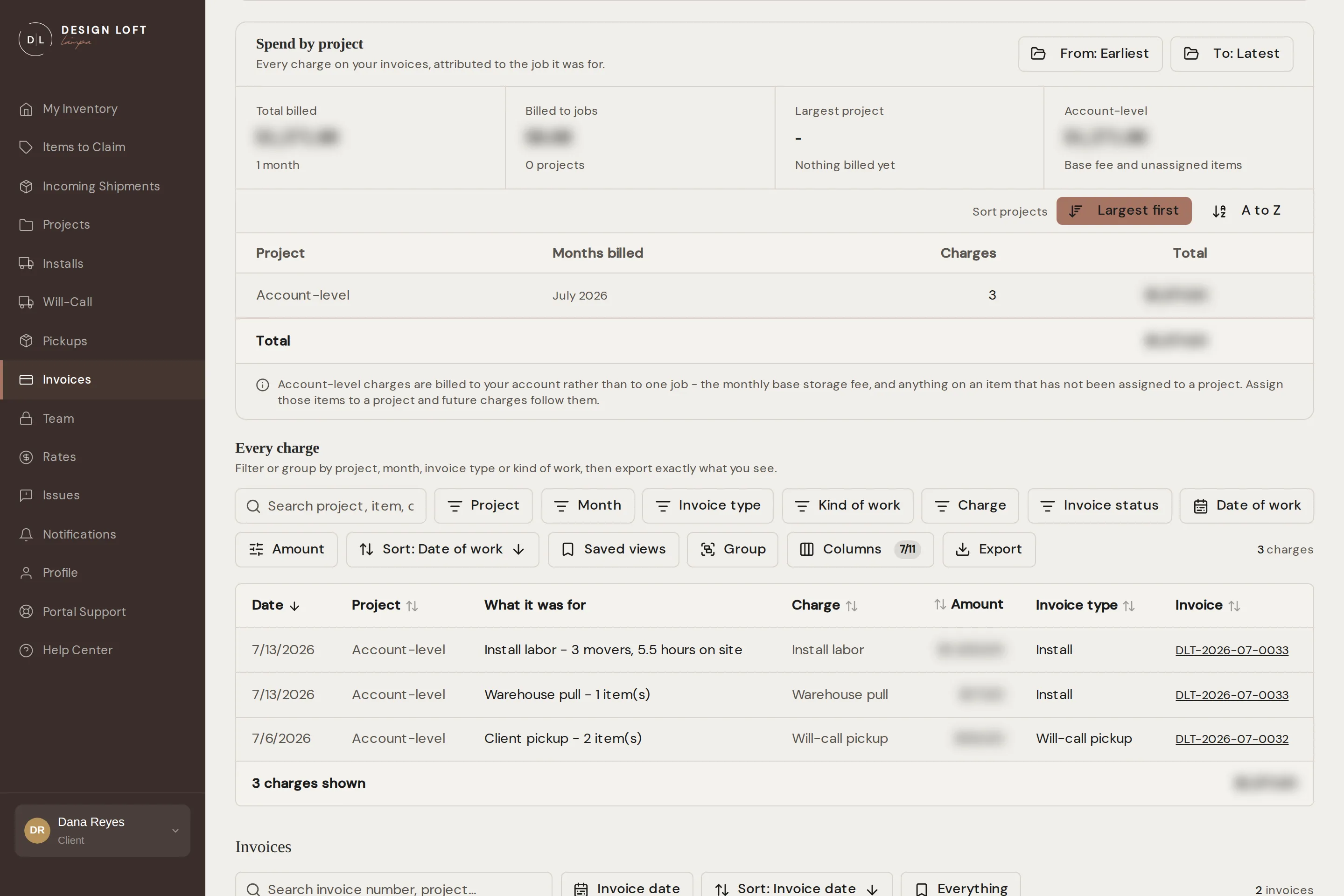
Spend by project, on the Invoices page just above the invoice list, breaks it out. Every line of every invoice we have sent you is attributed to the job it was for, so what you read here always adds up to the invoices you already hold.
The card at the top holds three things:
- From and To, which scope everything on the card to the months you care about. Spend is billed by whole months, so the window moves a month at a time. Clear takes you back to your full history.
- Four totals for that window: Total billed, Billed to jobs, your Largest project, and Account-level. Once you hold both a monthly statement and a job invoice, the last of those becomes On monthly statements, with the amount on job invoices beneath it.
- A row for each job, showing the months it was billed in, how many charges it carries, and its total. Once you hold both kinds of invoice, the row also splits the total between Monthly statements and Job invoices - the install, pickup and return invoices for that job - so you can see what a job’s month cost on its own invoice and what came on the statement after it. Sort projects has two buttons. Largest first, the default, puts the job that cost the most at the top. A to Z lists the jobs by name, the order you know your own clients in. Account-level sits last either way.
What a job cost this month
Section titled “What a job cost this month”To read one month, job by job:
- Open Invoices.
- Set From and To to the same month.
- Each row is now that month alone, with its total - and, once you hold both kinds of invoice, what was on the month’s statement against what was on the job’s own invoices. Sort by name to work down your own client list.
- For the lines behind a row, use Every charge below it with Month set to the same month and Group by project - or set Invoice type to Monthly statement to see only what was new on the statement, with the install already paid left out.
A statement for one job
Section titled “A statement for one job”Next to each job is Statement: a PDF covering that job and nothing else, on our letterhead, with every charge grouped by month and totalled. It is the document to attach to your own bill.
- Open Invoices.
- Set From and To if you only want part of the history. Leave them alone for everything we have ever billed to the job.
- Find the job in the Spend by project table.
- Select Statement. The PDF opens in a new tab, ready to save or forward.
The statement follows the window you set and names it at the top, so one covering March to June says so on the page. Under the total it says how many of your invoices those charges came from, and where the job carries more than one kind of charge it breaks the total down that way too.
Only invoices we have actually sent you are on it. Nothing is counted before it has been invoiced, so the statement and your invoices always tell the same story.
Every charge, line by line
Section titled “Every charge, line by line”Below the summary, Every charge is the full list behind those totals. Each row gives the date the work happened, the job, what it was for, the kind of charge, the amount, which kind of invoice it came on, and a link to the invoice it is on.
- Search finds a piece, a job, or an invoice number.
- The filters narrow the list by Project, Month, Invoice type (a monthly statement, or the kind of job invoice), Kind of work (receiving, storage, installs, outbound pickups, claims and repairs, credits and adjustments), Charge, Invoice status, or amount. Clear all resets them.
- Group turns the list into sections with a subtotal on each - by project, month, invoice type, kind of work, charge, or invoice.
- Columns switches on the ones that start hidden: quantity, rate, month, and kind of work.
- Export downloads exactly what is on screen as a spreadsheet, with the columns you have showing.
The list opens the way you left it. Filters, grouping, and the columns you switched on are kept on the computer you set them on, so coming back to Every charge does not mean setting up the same view again. If you open the page from a link somebody sent you, the list shows exactly what that link says and your own view is left as it was, waiting for you next time.
Account-level charges
Section titled “Account-level charges”Some charges belong to your account rather than to one job: the flat monthly base storage fee, the processing fee on a card payment, and anything on an item that has not been assigned to a project. Those are shown as Account-level rather than shared out across your jobs, because they are not a cost one client owes.
If the Account-level figure is bigger than you expect, it is usually pieces waiting to be assigned. Put them on a project and their charges follow that job - see When items arrive without a project.
That includes charges we have already invoiced. An Account-level line for a piece you assign later is re-filed under its job on the invoice it is already on, so money that had nowhere to go ends up where you can re-bill it rather than stranded in a bucket. The amount, the invoice, and the total never change - only the job the line is filed under. It happens the moment you save the assignment, so a statement you pull straight afterwards already reads the way you want to send it.
One kind of charge is filed by the delivery rather than by the piece: crate and pallet handling, which is charged once for the container whatever came on it. Assigning the pieces out of that crate does not move it, because it was never one piece’s charge. If it is still sitting under Account-level, or under the wrong job, after the pieces are filed, tell us: we correct the delivery and the handling line moves across with everything else.
A charge follows its piece. If a piece turns out to have been filed under the wrong job and we correct it, everything that piece has ever been billed for moves onto the right job with it - including charges on invoices we have already sent you, because the money was always that job’s and the old filing was simply a mistake. Tell us when you spot one and we will correct the piece. The move is done as we make the correction, not later that week.
What never changes when that happens: the amount, the invoice it is on, and the invoice total. Only the job the line is filed under moves, so your balance is identical before and after. If you have already sent a client a statement for a job, re-pull it after a correction so the copy you hold matches ours.
Two kinds of invoice
Section titled “Two kinds of invoice”Most of what you get from us arrives on a monthly statement: storage and the pieces we received for you that month. It reads Monthly statement in the Type column of your invoice list.
Installs and will-call pickups are invoiced on their own, once the job is finished. They are one-off jobs rather than something that runs month to month, so they are not held back to appear on your next statement - you get an invoice for that job, covering only that job. You will find it in the list here like any other, and also on the install or pickup itself, so you can always tie an amount back to the day’s work it paid for.
When each one reaches you. A pickup is fully priced the moment your crew signs for the load at the dock, so its invoice is raised right then and reaches you as soon as we send it. An install is billed for the crew and the hours the job actually took, so its invoice waits until those hours are confirmed - usually a few days after install day rather than that same evening. The exception is an install where your own install company bills you for the crew: there is no crew bill for us to wait on, so that invoice can go out as soon as the job is closed out. Nothing is owed in the meantime, and the job’s own page in the portal shows the invoice as soon as it goes out.
A job’s invoice names its project. When a job is for one of your projects, its invoice says which. That goes for installs, will-call pickups, pickups we collect for you, vendor returns, and repairs alike. The label beside its status reads, for example, Install for Harborside Residence, and the project is printed at the top of the PDF, so the copy you forward to your client shows which job it bills. Job invoices you already hold name their project too, on the page and on any PDF you download from now on. A will-call pickup that pulled pieces from more than one project names none of them, because it is not for a single job.
An install that ran several days is still one invoice. It is billed once for the whole job when the work is finished, and the period on it reads from the first day on site to the last rather than naming only the final day.
The job’s invoice also settles the pieces that left. When items go out the door on an install, a will-call pickup, or a vendor return, their storage for the month they left goes on that job’s invoice rather than waiting for your next monthly statement - and if a piece left before its receiving had been invoiced, that receiving line comes along too. So the job’s invoice is the last place those pieces appear, and the next monthly statement simply no longer lists them. A month of storage is only ever charged once: if that month’s statement had already gone out, the job’s invoice does not repeat it.
A pickup we collect for you is invoiced on its own too, and it is the one that takes longest to reach you. When we send a truck out to collect items and bring them to the warehouse, a transport company does the driving and bills us for the trip, so the invoice cannot be raised until that bill arrives - usually a few days after your items are already on the shelf. It covers the trip and nothing else: the line reads Item pickup, as does the Type column in your invoice list, and the receiving and storage for the pieces we brought in are charged the normal way on your monthly statement, because those pieces have just arrived rather than left. A pickup you called off is never invoiced at all.
A missed delivery is invoiced the same way. If our truck makes the trip but the install cannot happen - the site is not ready, or nobody can let the crew in - your items come back to storage and the trip is billed on an invoice of its own, just as a finished install would be. The request’s page shows it as Invoice for this delivery trip, and in your invoice list it reads Install, because it is billed as one - see If a delivery is missed.
A piece collected for a vendor return gets an invoice of its own too. When a piece goes back to its vendor, the return is fully priced the moment the freight driver signs for the piece at our dock, so its invoice is raised right then, just like a pickup’s. On it: a per-piece Vendor return pull line for getting the piece off the rack and staged, plus the piece’s storage for the month it left and its receiving if that had not been invoiced yet - the same settling-up any departing piece gets. It is kept off your monthly statement on purpose: a small invoice covering only the return is easy to send to the vendor along with your reimbursement claim. It reads Vendor return in the Type column of your invoice list.
A piece coming back does not undo an invoice. If a piece your crew collected comes back to us because it is defective or the vendor shipped the wrong thing, the pickup’s invoice stands as it was issued: the pull, the storage, and the receiving on it all paid for work we actually did, so nothing is re-billed and nothing is credited automatically. What the piece does next bills the ordinary way. Back on the racks puts it on storage again from the month it returns. Waiting to go back to its vendor costs nothing at all, because a piece queued for a vendor return is not on storage, and the return gets its own invoice when the freight company collects it. If you think a come-back warrants a credit, talk to us. Anything we agree comes off your next invoice - see Credits and one-off charges.
What is on an invoice
Section titled “What is on an invoice”- Storage - billed monthly for the space your items take up, based on the size we measure at receiving. It is charged on the box, once for each box each month, however many pieces are inside it - see How storage is charged. Storage runs until a piece physically leaves the warehouse, so anything staged for an install or waiting on a will-call pickup is still stored until it goes out the door. The month a piece leaves in is billed on that job’s own invoice - the install’s, the pickup’s, or the vendor return’s - rather than your next monthly statement - see Two kinds of invoice. Those measurements are yours to see: every box’s page in your inventory lists its dimensions, weight, and cubic feet - see How big a box is, and how heavy.
- Base Storage Fee - a flat monthly amount that goes along with storage. It is charged in any month we are holding items for you, and it drops off automatically once your storage is empty for the month.
- Receiving - appears on the monthly statement for the period the freight arrived in. If a piece heads out on an install or pickup before its receiving has been invoiced, the line goes on that job’s invoice instead, so it never trails onto a later statement. Receiving lines name the rate and the piece, like Receiving Tier 3 - Bristol Track-Arm Sofa; How receiving is charged explains what sets the rate.
- Install labor - on the invoice for that install. The line names the crew and the hours they were on site alongside the hourly rate, so you can see how the amount was reached, like Install labor - 3 movers, 6.5 hours on site. Because it follows the hours the day actually took, the amount is settled after install day rather than fixed in advance. If we agreed a flat price for the job with you beforehand, the line says (agreed flat price) and that agreed amount is what you pay. Assembly and blanket wrap, when we did either, are separate lines. If you arranged the install crew yourself and they invoice you directly, there is no install labor line on your invoice at all - see If your install company bills you directly.
- Warehouse pull - charged per piece we take off the rack for you, on an install, a will-call pickup, and a vendor return alike. Getting your pieces down, checked and staged is the same work whichever way they leave, and it is the same rate. On an install invoice the line reads Warehouse pull; on a pickup invoice the same work reads Client pickup; on a vendor return invoice it reads Vendor return pull.
- Item pickup - the trip we made to collect items for you and bring them to the warehouse, on that pickup’s own invoice. It is priced from what the transport company charged for the trip plus our handling, so it is settled after the trip rather than quoted before it, and a pickup invoice is normally this one line. Because it brings pieces in rather than sending them out, it groups under Receiving in the Kind of work filter.
- Missed delivery trip - on the invoice for a trip our crew made when the install could not be completed. Like install labor, the line names the crew and the hours, like Missed delivery trip - 2 movers, 3 hours: the drive out, the drive back, and returning your items to their shelves. The warehouse pull line appears alongside it, because the pieces were pulled and staged for the trip all the same. See If a delivery is missed.
- Repairs and damage claims - the time spent working a claim, on the monthly statement for the period the work happened in. A repair itself comes on its own invoice, which reads Claim / repair in your invoice list. Its line names what was repaired, the hours when the work was by the hour, and the day it was finished, like Damage repair - Refinish scratched top - 3 hours - Sep 17, 2026. Like an item pickup, it is priced from what the repair shop charged for the work plus our handling, so it is settled after the repair rather than quoted before it. See If we repair the piece.
- Card processing fee - added at the moment we charge the card you keep on file, so it lands on the invoice being paid rather than on a later one. There is no fee when a bank account (ACH) is the method on file, and none at all when you pay another way - see The processing fee when we charge your method on file.
- After-hours / weekend callout - a flat fee for an install or a pickup worked on a day we are normally closed, which in practice means a Saturday or Sunday. It pays for opening the building outside our regular hours, so it is charged once for that job and never per item, and it lands on that job’s own invoice alongside the rest of the work. It only appears when the work actually happened on a closed day. An install spread over several days picks it up if any day of the run falls on a weekend, and still only once - a Friday-to-Saturday job pays one callout, not two.
- Credits & adjustments - money we owe you or a discount we agreed, shown as a minus amount, a one-off charge for something none of the lines above covers, or a price change that corrects the amount of another line. Each one has a note saying what it is for - see Credits and one-off charges.
If you have been with us a while, the Base Storage Fee is the line that used to read “Online inventory access (WMS)”. The amount has not changed - the name now says what it actually is, and it only appears in months when your items are with us.
How receiving is charged
Section titled “How receiving is charged”Receiving is charged per piece, and which rate a piece gets comes from the box it arrived in. Nobody at our dock picks that by hand. When a box is checked in we record three things - what is inside it, how big it is, and how much it weighs - and those decide the rate between them. Two boxes that are alike are always charged alike.
There are six per-piece receiving rates, from the lightest work to the heaviest:
- Receiving Tier 1 - soft goods: linens, bedding, fabric, pillows, and hardware, boxed together and not oversized.
- Receiving Tier 2 - rugs and rug pads, at one rate whatever the size of the rug. See Rugs are shelved sealed.
- Receiving Tier 3 - small to moderate pieces in an ordinary cardboard box.
- Receiving Tier 4 - large pieces: a box that is bulky, or heavy enough to be awkward for one person.
- Receiving Tier 5 - oversized: a box big enough to take up a bay of its own, but not heavy. Bulky rather than back-breaking.
- Receiving Tier 6 - heavy: anything past the top weight line, whatever size the box is. A stone table base in a modest crate is the heaviest thing the crew lifts that day, so weight on its own puts a piece here.
Weight and size outrank what is in the box. A box heavy enough for Tier 6 is charged at Tier 6 even when its contents would otherwise make it soft goods, a rug, or light bulbs, and a box big enough for Tier 5 works the same way. The cubic feet and the pounds where each line sits are on the Rates page, so you can tell from a vendor’s own box dimensions where a piece will land.
A box of light bulbs is priced per bulb
Section titled “A box of light bulbs is priced per bulb”Light bulbs are the one thing not priced per piece by size. Priced like furniture, a big box of bulbs could cost more to check in than the bulbs cost to buy - so it works differently. A box that is nothing but bulbs takes one charge at the Tier 1 rate for the box itself, and then each bulb we count and check in bills at its own small per-bulb rate. On your invoice that reads as one Receiving Tier 1 - box of light bulbs line, plus a Light bulb inspection line counting the bulbs.
It applies only when bulbs are all that is in the box, and it goes by what each piece actually is, never what it is called - a chandelier with “12-bulb” in its name is a light fixture, received at its size tier like any other piece. A mixed box, say bulbs packed in alongside a lamp, is priced by its size in the ordinary way, and so is a bulb box big or heavy enough to reach one of the top two tiers on its own. Both bulb amounts are on the Rates page.
Crates and pallets are charged once for the delivery
Section titled “Crates and pallets are charged once for the delivery”A wooden crate has to be prised open and broken down, and a pallet has to come off the truck on a forklift. That is its own job, and it is the same job whether one box or fifty came on it - so it is charged once for the container, not per piece:
- Crate handling - once for each wooden crate on the delivery.
- Pallet handling - once for each pallet on the delivery.
When a delivery brought more than one, the line says how many, like Pallet handling ×2.
The pieces that come out of the crate, or off the pallet, are then received at their own tier like anything else. So one heavy item shipped in a crate reads as a single receiving line at that piece’s own tier plus one crate handling line; a pallet carrying twenty boxes reads as one pallet handling line plus twenty ordinary receiving lines. Amounts are on the Rates page.
Two lines look slightly different. A rug you asked us to open and inspect reads Receiving Tier 2 (rug inspection), and that rate replaces the standard rug rate rather than adding to it. And a box that arrived without your sidemark carries a per-item handling surcharge alongside its receiving line, for the work of tracking down whose it is.
Pieces that were already with us are not charged receiving again. Anything we took in for you before we moved our billing into the portal had its receiving charged at the time, on our old system. Those pieces came across into your inventory with all their history, and they bill for storage every month like everything else, but they never pick up a second receiving line here. If you do see a receiving charge on a piece that has been on our racks since before the move, tell us and we will take it off.
The amounts are on the Rates page in your sidebar, along with the cubic feet and pounds that separate one tier from the next - see Rates. They are also in the Schedule of Rates inside your Warehouse Agreement, which you can open any time from Your Documents on the dashboard; your copy is kept as you signed it, so where the two differ the Rates page is the current one.
If a receiving line ever looks off, ask us. We keep the measurements behind every box, so we can tell you exactly what put that one where it landed.
How storage is charged
Section titled “How storage is charged”Storage is charged on the box, not on each piece inside it. A box on a shelf takes up the same room whether it holds one lamp or six matching chairs, so it is charged once a month, for the cubic feet we measured when it arrived.
This is the one part of your bill that works the opposite way round from receiving. Receiving is per piece, because checking, photographing, and shelving six chairs is six pieces of work. Storage is per box, because those six chairs in one carton sit in one carton’s worth of space.
So on a statement:
- A box holding several pieces shows one storage line for the month, not one line per piece.
- Older pieces that came to us from our previous system without a box of their own are measured individually, so each of those carries its own storage line.
- Storage bills by the calendar month and is not prorated - see Rates.
Every box’s page in your inventory lists the dimensions, weight, and cubic feet behind its storage line - see How big a box is, and how heavy. If you ever see the same box charged twice for storage in one month, tell us and we will put it right.
Invoice statuses
Section titled “Invoice statuses”- Sent - issued and payable.
- Overdue - the due date has passed and part or all of it is still owing. The grace period before an invoice is marked this way is on the Rates page under payment terms. If you have paid it another way and it still reads Overdue after a day, tell us.
- Paid - settled, however the payment reached us.
With automatic billing on (the default), invoices are charged to your payment method on the due date and you will get a notice before each charge - no action needed. Where a card is the method on file, a processing fee line goes onto the invoice before it is charged, and the notice states it - see The processing fee when we charge your method on file.
However you pay, the invoice keeps up
Section titled “However you pay, the invoice keeps up”An invoice is not only marked Paid when we charge the method on file. Pay us another way - a check in the mail, a bank transfer, a card taken over the phone, or the pay link on an invoice emailed to you - and the payment makes its way back to the portal on its own, usually within a minute and by the next morning at the latest. You do not have to tell us to mark it paid, and you will not be chased for something you have already settled.
Paying another way also avoids the processing fee, which is only added when we run the method you keep on file.
If we correct an invoice you already have
Section titled “If we correct an invoice you already have”Once in a while an invoice needs correcting after it has reached you - a box we re-measured, a charge filed against the wrong job, a date that was off, or a discount we agreed with you. As long as it is not yet paid in full, we correct that invoice itself rather than sending you a new one:
- It keeps its number and its place in your list, so anything you have filed against that number still matches.
- Its lines and total are brought up to date. Open it to see the corrected version. Any PDF you download from then on matches it, so if you had already downloaded or forwarded a copy, download it again.
- What we agreed with you stays on it. Credits, discounts, and price changes already on the invoice are kept when the rest of it is corrected - see Credits and one-off charges.
- Nothing is charged while we are working on it. With automatic billing on, the charge waits until the correction is finished, then goes through for what the corrected invoice still owes.
If you have paid part of the invoice, we can still correct it, with one limit: a correction never brings its total below what you have already paid on it, so you are never left having paid more than the invoice comes to. What you paid stays paid, and the amount still due changes to match the corrected total. If we owe you more than that, the rest comes off your next invoice as a credit.
An invoice you have paid in full stays exactly as it is. Anything we correct afterwards comes off your next invoice as a credit.
If we withdraw an invoice to correct it
Section titled “If we withdraw an invoice to correct it”Occasionally a correction cannot be made on the invoice you already have - for example when charges have to move from one statement onto another. Then the invoice comes out of your list while we put it right, and the corrected one arrives afterwards, sometimes under a new number. Nothing is owed in the meantime, and nothing is charged to your payment method for an invoice that is not in your list.
Unlike a correction made on the invoice itself, this never happens to an invoice you have paid anything against, part or whole. If an invoice does disappear and nothing replaces it within a day or two, ask us.
If you pay part of an invoice
Section titled “If you pay part of an invoice”Paying part of an invoice is fine, and the portal shows it. Open the invoice and, just under the total, you will see how much has been received and how much is still due. The invoice stays Sent until nothing is left owing, then turns to Paid on its own.
With automatic billing on, the charge on the due date is only ever what is still owed - never the whole invoice again. Where a card is on file, the processing fee is worked out on that remainder too, not on the original total.
If we correct an invoice you have paid part of, what you paid stays paid and the amount still due follows the corrected total - see If we correct an invoice you already have.
The processing fee when we charge your method on file
Section titled “The processing fee when we charge your method on file”When we run the payment method you keep on file - on the due date with automatic billing on, or when we put a charge through against an open invoice for you - a processing fee goes onto that invoice as its own line, and the invoice is then paid including it.
- It applies to a card on file. A bank account (ACH) on file is charged at face value, with no fee.
- It is worked out on what is still owed at that moment, not on the original total. If you have already paid part of an invoice another way, the fee follows the smaller remainder.
- Paying us another way carries no fee at all - a check in the mail, a bank transfer you send, or the pay link on an invoice emailed to you.
- The current rate is on the Rates page under payment terms, and the line on your invoice names the rate it was worked out at.
So an invoice you already hold can pick up one extra line on the day it is paid. Nothing else on it changes: no other line is re-priced, and the fee is only ever added once, so an invoice never ends up carrying two of them even if a first attempt did not go through and we tried again.
If a card charge does not go through and you settle that invoice another way instead, the fee line it picked up along the way should come off. Tell us and we will remove it.
The fee sits under Account-level on the invoice, on the PDF, and in Spend by project, because it is the cost of settling a statement rather than work we did on one job - see Account-level charges. In the Every charge list you can pick it out with the Charge filter, where it reads Card / ACH processing fee.
If you would rather not pay it, put a bank account (ACH) on file instead of a card - see Payment methods - or turn automatic billing off and settle each invoice by check.
Credits and one-off charges
Section titled “Credits and one-off charges”Sometimes we owe you money - say you supplied the fabric for a repair we arranged. Rather than send you a separate document to match up, we take it off an invoice as a credit: a line of its own with a note saying what it is for, and a minus amount, like -$180.00. The total already has it taken off, so the total you see is what you owe.
A discount we agree with you works the same way. If we settle on a different total for an invoice - a courtesy discount, say - the lines on it stay exactly as they were and a credit for the difference is added underneath, with a note saying what it is for. You can see both what the work came to and what we agreed.
Now and then the same kind of line goes the other way: a one-off charge for something none of our usual lines cover, like an extra trip out to a site. It reads like any other line, with a note saying what it was for.
The third kind is a price change. When we correct the amount of one of your lines, the original line stays exactly as it was and a price change line sits right under it for the difference. It starts Price change:, names the line it corrects, and gives the amount it was and the amount it is now, so you can see both at a glance. Its own amount is the difference - a minus amount when the price came down - and it is filed under the same job as the line it corrects.
What to expect:
- They can go on an invoice until it is paid in full. We can add one to an invoice you already have, including one you have paid part of. It keeps its number, and its total changes to match - see If we correct an invoice you already have. Once an invoice is paid in full, it stays as it is, and a credit we agree afterwards comes off your next one.
- They stay put. If we later correct the rest of the invoice, credits, discounts, and price changes already on it are kept.
- They are filed under the job they are for, like every other line, so a credit comes off that job’s subtotal and its total in Spend by project. One that belongs to no single job sits under Account-level.
- The PDF matches the portal. The credit is on the PDF, in the total, and on our books alike. With automatic billing on, the charge on the due date is the total after the credit.
- An invoice never goes below zero, or below what you have already paid on it. If a credit is bigger than that, it takes the invoice down as far as it can go and the rest comes off your next one.
- They are easy to pick out. In Every charge, all three read Credits & adjustments, under Charge and under Kind of work alike.
If you think you are owed a credit, tell us with the invoice number and what it is for.
Questions about a charge
Section titled “Questions about a charge”If something on an invoice looks off, contact our team with the invoice number and we will walk through it with you.