

Reporting an issue
If an item has a problem - a scratch, missing hardware, or just a question about it - open an issue. Issues are threaded conversations tied to the item, so photos, decisions, and follow-ups all stay in one place instead of scattered across emails.
Opening an issue
Section titled “Opening an issue”Start from either place:
- Issues in the sidebar → Report an issue
- An item’s detail page → Report an issue (the item comes preselected)
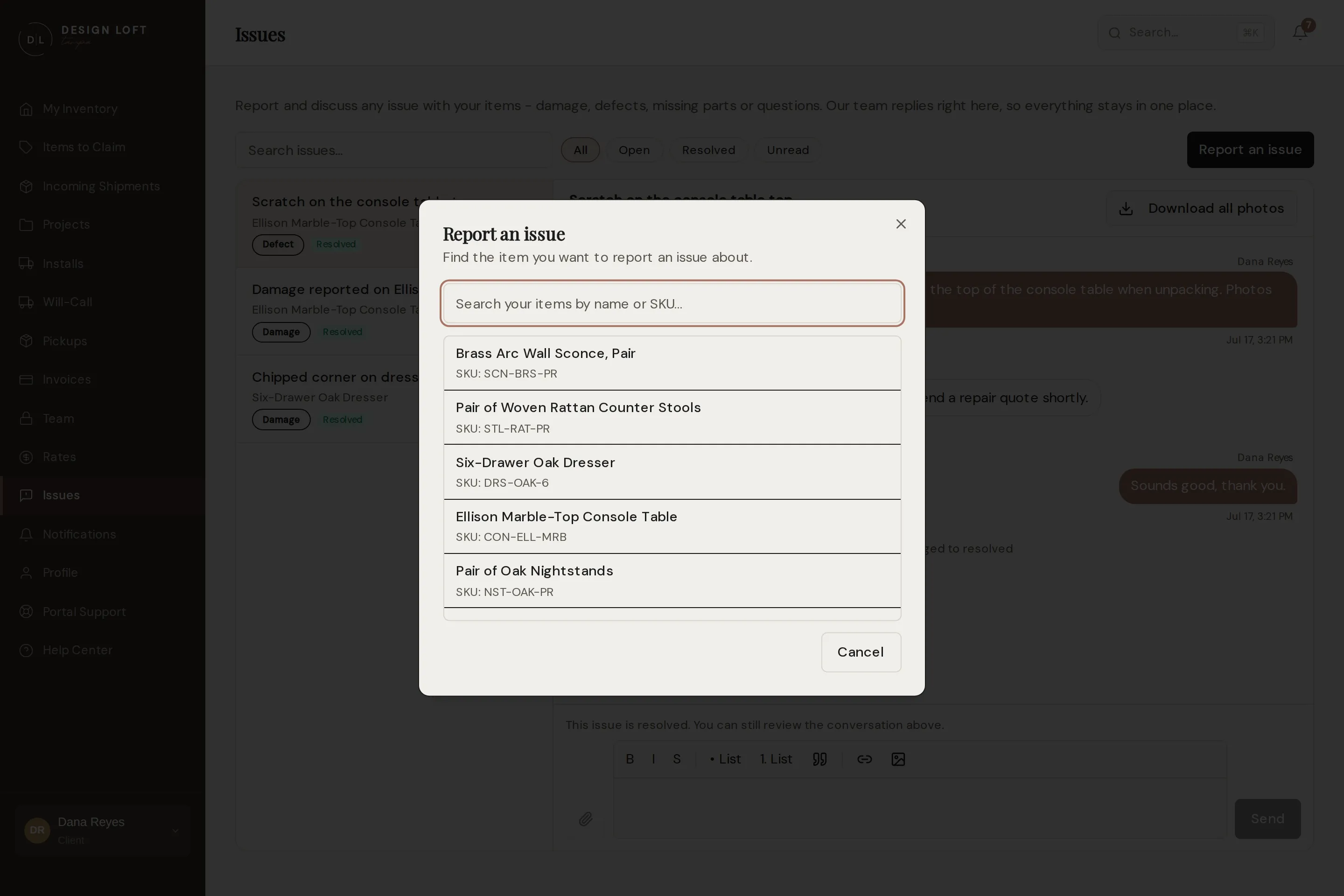
Fill in:
- Item - search your items and pick the one affected.
- Type - Defect / quality issue, Missing parts, Question, or Other.
- Subject - a one-line summary, like “Scratch on the console table top”.
- Details - what you found. Formatting is supported, so lists and emphasis work, and you can paste or drag a photo straight into what you are writing when it belongs beside a particular sentence.
- Attachments - photos or PDFs, sent with the paperclip button. Pictures make everything faster.
Either way of sending a photo works, and both end up in the same thread. See Replying.
Submit, and the issue opens in our queue - the team is notified immediately.
The Item list is not limited to what is on our racks. A piece already installed at the site, collected by your own crew, or sent back to its vendor is still there to pick, because that is exactly when a problem tends to surface - even though those pieces are out of the everyday inventory list, as in Pieces that have left our care. Type part of the name to find one.
The one exception is a job that has since been archived: its pieces retire from this list along with it. If a problem surfaces on one of those, ask us and we will bring the project back so the issue can be filed as usual.
What happens next
Section titled “What happens next”We reply in the thread with next steps: a repair plan, a vendor claim, replacement parts, or an answer to your question. You will be notified when there is something new; see the notifications feed.
When we find the problem first
Section titled “When we find the problem first”You may find a conversation already waiting for you. Any time our team flags a piece as damaged or missing parts, an issue is opened for it, with photos attached, and you are notified once it has been checked over.
That happens at two moments, and the second one is where most damage turns up:
- At the dock, when a box arrives crushed, punctured, or clearly mishandled. Nothing has been opened yet, so that first report describes the outside of the box.
- At inspection, when the box is opened and the piece comes out on the blanket. This is where a cracked leg, a gouged finish, or a missing part is actually found, and none of it is visible from the outside.
If a thread was already opened for that piece at the dock, the inspection does not start a second one. The close-up photos and the inspector’s notes go into that same conversation. If the report has already reached you, they arrive as a new reply and you are notified. If it has not, they simply join the report before it is sent, so what lands with you is the whole story at once. Either way the thread reads in order: what the box looked like, then what was inside it.
The pictures on a damage report are the damage itself - the close-ups taken while the piece was out of its box. Shelf shots, carrier labels, and vendor catalog pictures are kept out of it, so what you are looking at is what is wrong. Click any of them to fill the screen and page through the rest, as in Looking closely at a photo.
We check a damage report before you get it
Section titled “We check a damage report before you get it”A report written at the dock or on the inspection bench is a first impression: the photos can be unusable, and the description can be one hurried word. Sending that to you as a damage claim is not much use to anybody, so it does not go straight out.
Here is the order things happen in:
- Whoever is handling your piece flags it the moment they see a problem.
- The report goes to one of our managers, not to you. They look at the photos, add any that are missing, and make sure the description says what is actually wrong with the piece.
- They send it on. That is when the thread appears under Issues and you are notified by email and in the portal.
What the item’s Condition shows in your inventory while this happens depends on what was flagged:
- Only the box was damaged. The piece keeps reading Good while our manager checks whether the damage reached what is inside. It changes to Damaged when the report is sent to you, so the two arrive together.
- The piece itself was damaged. Its condition changes the moment it is flagged, so it can read Damaged for a short while before the conversation about it lands. Nothing has been lost, it is being checked.
Not every flag becomes a report. Sometimes the box took the hit and the piece inside is perfect. When our manager can see that, no claim goes out, because a damage report about an undamaged piece only creates work for you. The piece stays Good, or goes back to Good if it had already been changed.
If a piece reads Damaged and you have not heard from us about it, ask us and we will tell you where it stands.
When only some of a set is damaged
Section titled “When only some of a set is damaged”Eight of the same dining chair is one line in your inventory, with a count. When only some of them are damaged we say so up front: the report reads “3 of 8 damaged”, so you know how many to claim or replace without asking. The line’s Condition still reads Damaged in your inventory, because part of it is - open the issue to see how many pieces that covers.